Sonora
Transcription on your own computer.
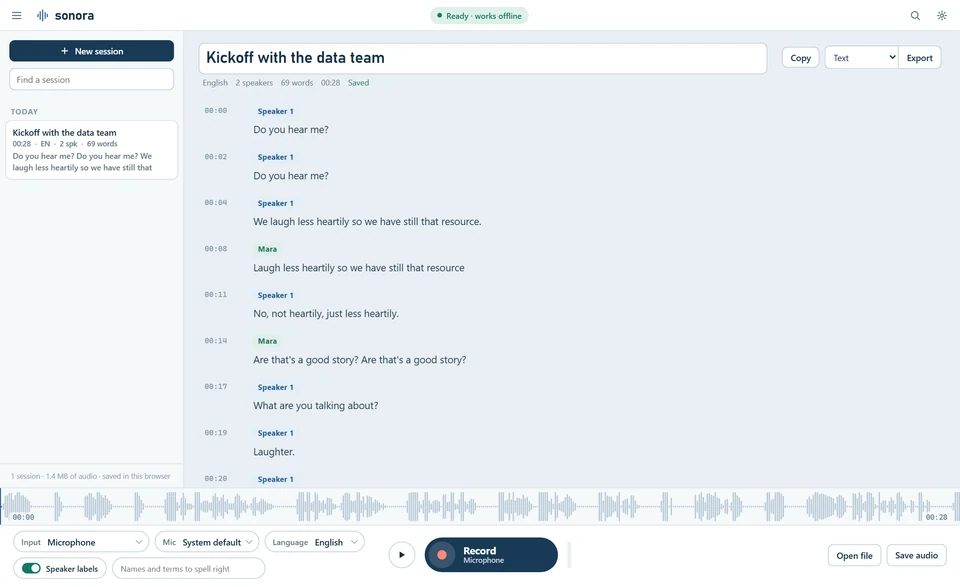
Sonora is a small application I use to transcribe conversations, interviews, and dictation. It runs in the browser, the speech recognition runs on the laptop, and the recordings stay there. I built it because I am not allowed to use cloud services for audio at work and still need written records.
Runs in this browser. The speech models (about 86 MB) are downloaded on first use and stay on your computer.
What Sonora does
- Record From the microphone, from another program or browser tab, or both at once. You can also open an existing audio file.
- Transcribe The text appears while the recording runs. Speakers are told apart automatically and can be given names.
- Review Click a timestamp to listen to that passage. Correct sentences directly in the text. Search within the transcript.
- Save and export Each session is stored locally together with its audio. Export as text, Markdown, SRT, WebVTT, or JSON.
- Install Sonora can be pinned to the taskbar like a regular program, or used in a browser tab. The data is the same in both cases.
How it works
The speech recognition is Moonshine, an open-source model that runs in the browser as WebAssembly. It supports English and German. The models are about 86 MB in the smaller variant and about 273 MB in the larger one, and they are downloaded once. After that Sonora works without an internet connection.
There is no server, no account, and no transfer of data to me or to anyone else. Chrome or Edge on Windows or macOS are recommended.
Limitations
Sonora recognises two languages, and you select one before recording. Speaker attribution is an estimate; short interjections and people talking at the same time cause errors. With poor audio quality or strong accents, recognition is weaker than with the large cloud services. I do not yet have measured error rates for German. I recommend testing Sonora with your own recordings.
Use in organisations
Sonora consists of static files. IT can host them on an internal web server or distribute them as a folder that starts with a double click; neither installation nor administrator rights are required. The speech models can be included in the folder, in which case no internet access is needed at all. Each release contains checksums, a version file, an administrator guide in English, and a licence overview of all components.
Notes for an approval:
- Data location Audio and transcripts are stored in the browser profile of the respective computer. They can be deleted in the application or by clearing the browser's site data.
- Network traffic Whether data leaves the device can be checked in the browser's network panel. Once the models are loaded, no further communication takes place.
- Responsibilities Consent of the people being recorded, retention periods, and consultation of employee representatives remain with the organisation using the software.
- Provider and licence At present there is no company behind Sonora; I develop it as a private individual. Sonora itself is not open source; the components it uses are, and their licences are listed in the release. Trying it out is free. For ongoing use we agree a usage licence with support, depending on the number of workplaces.
Contact
If you would like to try Sonora, I would be glad to hear from you. I will happily send you the folder and the administrator guide, and you can take four weeks to test it on your own computers. I am glad to answer questions along the way, and if it turns out to be useful, we will find a licence that fits.
I am an enterprise architect at an insurance company in Wiesbaden. More about my work under Governed Intelligence.
Sonora
Transkription auf dem eigenen Rechner.
Sonora ist eine kleine Anwendung, mit der ich Gespräche, Interviews und Diktate transkribiere. Sie läuft im Browser, die Spracherkennung läuft auf dem Laptop, und die Aufnahmen bleiben dort. Ich habe sie gebaut, weil ich bei der Arbeit keine Cloud-Dienste für Audio nutzen darf und trotzdem schriftliche Protokolle brauche.
Sonora öffnen Kontakt aufnehmen
Läuft in diesem Browser. Die Sprachmodelle (etwa 86 MB) werden beim ersten Start geladen und bleiben auf Ihrem Rechner.
Was Sonora macht
- Aufnehmen Vom Mikrofon, vom Ton eines anderen Programms oder Browser-Tabs, oder von beidem gleichzeitig. Alternativ lässt sich eine vorhandene Audiodatei öffnen.
- Transkribieren Der Text erscheint während der Aufnahme. Sprecher werden automatisch unterschieden und können benannt werden.
- Nachbearbeiten Zeitstempel anklicken, um die Stelle anzuhören. Sätze direkt im Text korrigieren. Im Transkript suchen.
- Speichern und exportieren Jede Sitzung wird zusammen mit dem Audio lokal gespeichert. Export als Text, Markdown, SRT, WebVTT oder JSON.
- Installieren Sonora lässt sich wie ein normales Programm an die Taskleiste heften oder im Browser-Tab nutzen. Die Daten sind in beiden Fällen dieselben.
Wie es funktioniert
Die Spracherkennung ist Moonshine, ein Open-Source-Modell, das als WebAssembly im Browser läuft. Unterstützt werden Deutsch und Englisch. Die Modelle sind in der kleineren Variante etwa 86 MB und in der größeren etwa 273 MB groß und werden einmal heruntergeladen. Danach funktioniert Sonora auch ohne Internetverbindung.
Es gibt keinen Server, kein Konto und keine Übertragung von Daten an mich oder Dritte. Empfohlen werden Chrome oder Edge unter Windows oder macOS.
Grenzen
Sonora erkennt zwei Sprachen, die vor der Aufnahme ausgewählt werden. Die Sprecherzuordnung ist eine Schätzung; bei kurzen Einwürfen oder gleichzeitigem Sprechen kommt es zu Fehlern. Bei schlechter Tonqualität oder starken Akzenten ist die Erkennung schwächer als bei den großen Cloud-Diensten. Gemessene Fehlerraten für Deutsch liegen mir noch nicht vor. Ich empfehle, Sonora mit eigenen Aufnahmen zu testen.
Einsatz in Unternehmen
Sonora besteht aus statischen Dateien. Die IT kann sie auf einem internen Webserver bereitstellen oder als Ordner verteilen, der per Doppelklick startet; dafür sind weder eine Installation noch Adminrechte nötig. Die Sprachmodelle können im Ordner enthalten sein, dann ist kein Internetzugang erforderlich. Jede Version enthält Prüfsummen, eine Versionsdatei, einen Leitfaden für Administratoren (auf Englisch) und eine Lizenzübersicht aller Komponenten.
Hinweise für eine Freigabe:
- Datenablage Audio und Transkripte liegen im Browserprofil des jeweiligen Rechners. Sie lassen sich in der Anwendung oder über die Websitedaten des Browsers löschen.
- Netzwerkverkehr Ob Daten das Gerät verlassen, lässt sich in der Netzwerkansicht des Browsers prüfen. Nach dem Laden der Modelle findet keine Kommunikation mehr statt.
- Verantwortlichkeiten Die Einwilligung der Gesprächsteilnehmer, Aufbewahrungsfristen und die Beteiligung des Betriebsrats liegen beim einsetzenden Unternehmen.
- Anbieter und Lizenz Hinter Sonora steht derzeit keine Firma; ich entwickle es als Privatperson. Sonora selbst ist nicht Open Source; die eingesetzten Komponenten sind es, ihre Lizenzen sind in jeder Version aufgeführt. Das Ausprobieren ist kostenlos. Für den dauerhaften Einsatz vereinbaren wir eine Nutzungslizenz mit Support, abhängig von der Zahl der Arbeitsplätze.
Kontakt
Wenn Sie Sonora ausprobieren möchten, freue ich mich über eine Nachricht. Ich schicke Ihnen gern den Ordner und den Leitfaden, und Sie nehmen sich vier Wochen Zeit, es auf Ihren eigenen Rechnern zu testen. Fragen beantworte ich dabei gern persönlich. Wenn es Ihnen weiterhilft, finden wir danach eine Lizenz, die zu Ihnen passt.
Ich bin Unternehmensarchitekt bei einem Versicherer in Wiesbaden. Mehr über meine Arbeit unter Governed Intelligence.